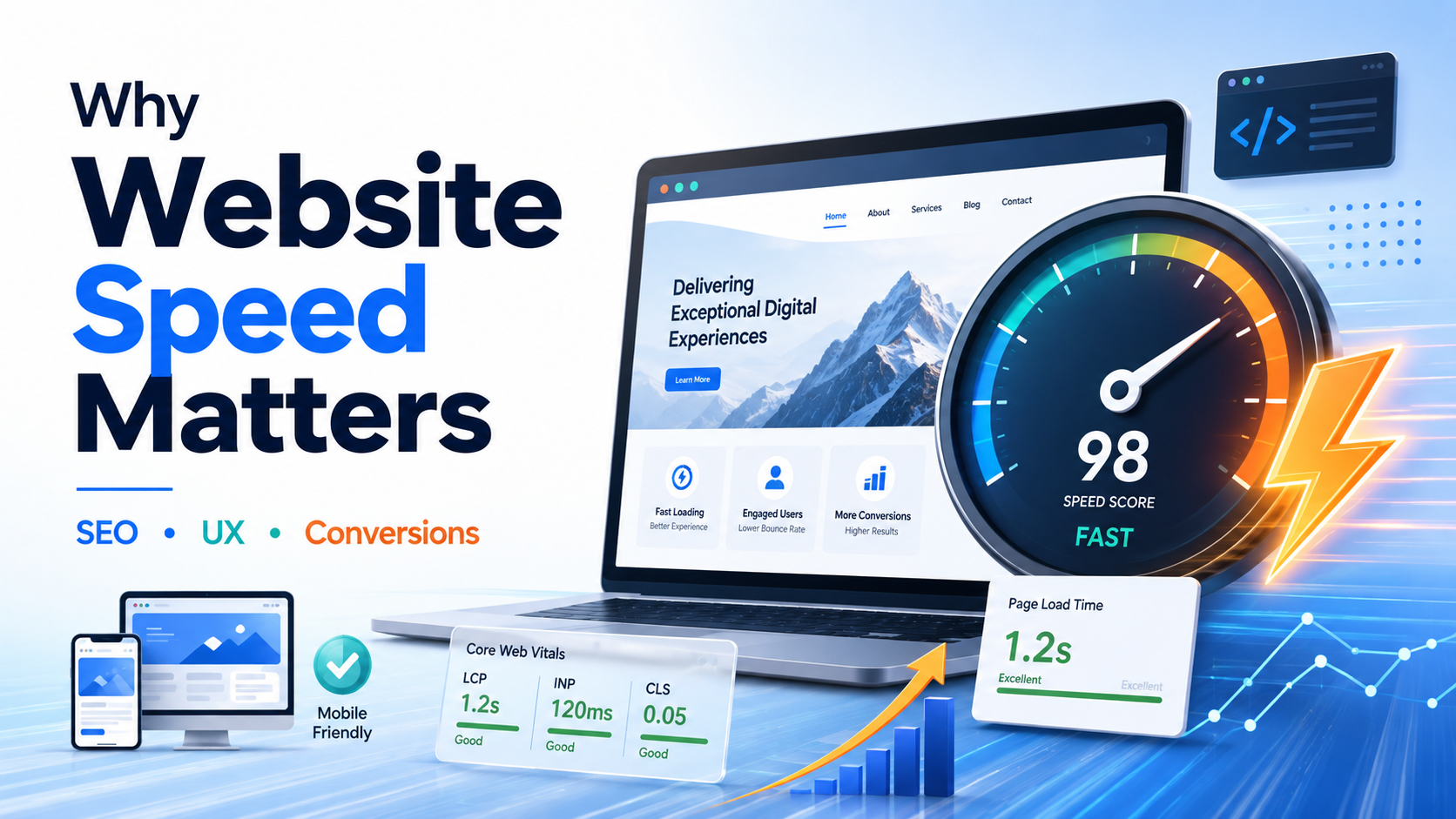
Website speed matters because a faster website creates a better user experience, supports stronger SEO performance, improves engagement, and can increase conversions and sales. Slow websites make visitors wait, create friction on mobile devices, and can reduce the number of people who complete important actions such as buying a product, submitting a form, or contacting a business.
Website speed is also part of the broader page experience that search engines evaluate. Google currently uses Core Web Vitals in its ranking systems, although good speed scores alone do not guarantee higher rankings.
For businesses, ecommerce stores, SaaS companies, publishers, service websites, and international brands, improving website performance is therefore not simply a development task. It is an important part of technical SEO, conversion optimization, customer experience, and long term digital growth.
If technical performance is limiting your website, explore our Technical SEO Services to identify and fix website speed, crawling, indexing, and Core Web Vitals issues.
What Is Website Speed?
Website speed describes how quickly a webpage loads, becomes visually usable, and responds when a visitor interacts with it.
Page speed is more complicated than measuring the number of seconds before a loading icon disappears.
A visitor experiences several stages:
- The page begins loading.
- Important content becomes visible.
- The page becomes responsive.
- Images, fonts, scripts, and other resources finish loading.
- The layout remains stable while the visitor interacts with it.
This is why professional website performance analysis looks at several metrics rather than relying on one simple loading time.
Common website speed related keywords and concepts include:
- website speed
- page speed
- site speed
- website loading speed
- page loading time
- website performance
- website speed optimization
- page speed optimization
- Core Web Vitals
- technical SEO
- Google PageSpeed Insights
- improve website speed
- speed up website
- mobile page speed
- website performance optimization
- page speed SEO
- WordPress speed optimization
- Shopify speed optimization
- ecommerce website speed
Why Website Speed Matters for SEO
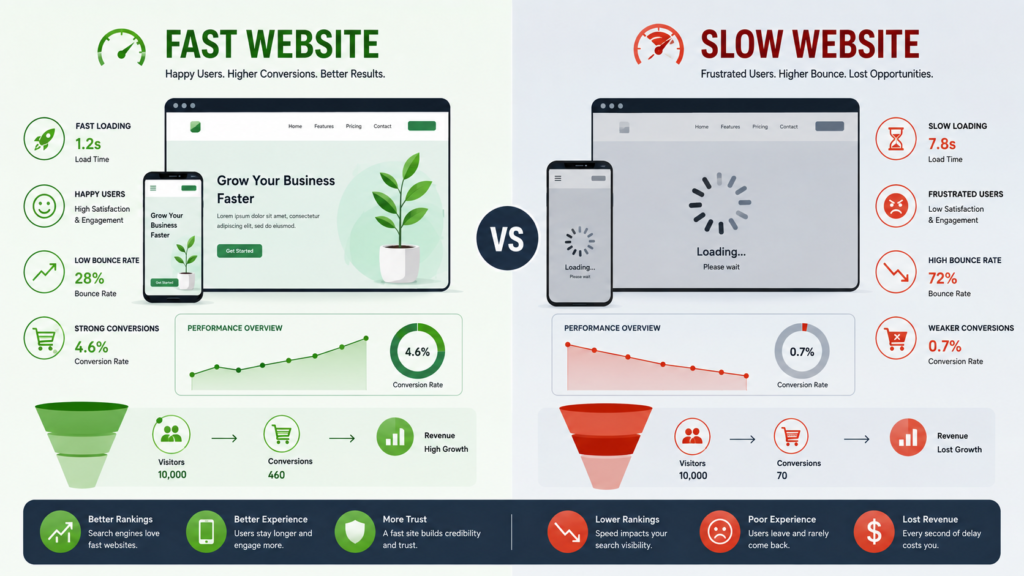
Website speed matters for SEO because search engines want to provide users with useful content and a good overall experience.
Google explains that its core ranking systems consider signals related to page experience, and Core Web Vitals are among the signals used by those systems. However, Google also makes an important distinction: having excellent Core Web Vitals does not automatically place a page at the top of search results. Content quality, relevance, authority, intent satisfaction, and many other factors still matter.
This means website owners should avoid a common SEO mistake.
Do not think:
Perfect PageSpeed score = guaranteed rankings.
A better way to think about it is:
Helpful content + strong technical SEO + good page experience + authority = stronger overall search performance.
Website speed should therefore support your broader SEO strategy rather than replace it.
What Are Core Web Vitals?
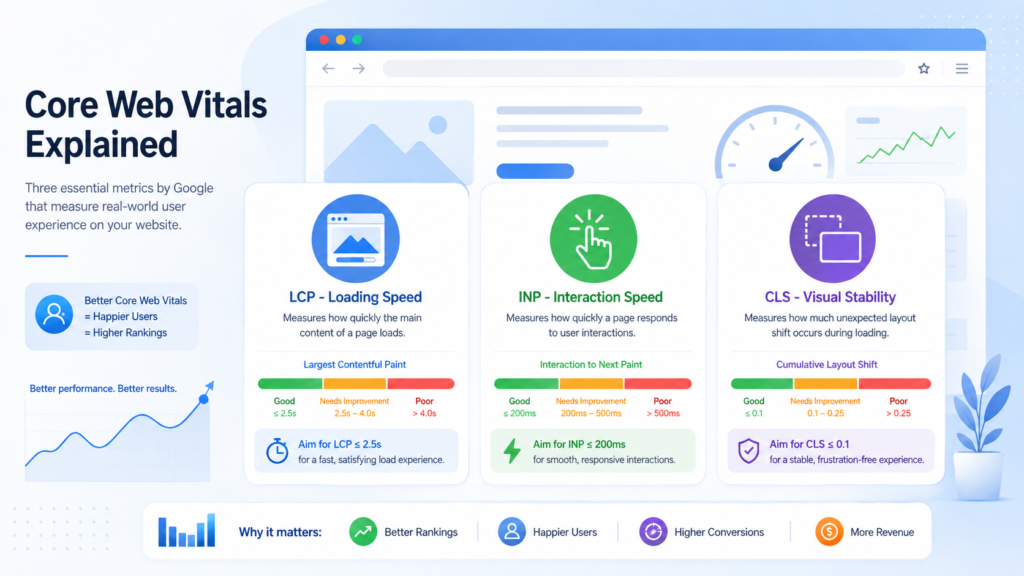
Core Web Vitals are Google’s user focused performance metrics for measuring important aspects of real world page experience.
Google currently focuses on three primary Core Web Vitals.
Largest Contentful Paint: LCP
LCP measures loading performance.
It generally measures how quickly the largest important content element in the visible area appears.
Google recommends an LCP of 2.5 seconds or less for a good user experience.
Large hero images, slow servers, render blocking resources, and poorly optimized CSS can contribute to weak LCP performance.
Interaction to Next Paint: INP
INP measures how responsive a page feels when users interact with it.
Google recommends an INP below 200 milliseconds.
Heavy JavaScript, complex scripts, third party tools, and overloaded browsers can make interactions feel slow.
Cumulative Layout Shift: CLS
CLS measures visual stability.
Google recommends keeping CLS below 0.1.
A common CLS problem occurs when a visitor tries to click a button, but an image, advertisement, banner, or font suddenly loads and moves the button.
That creates a frustrating experience and may cause accidental clicks.
Website Speed Improves User Experience
Users expect websites to respond quickly.
A fast website makes it easier to:
- Read content
- Browse products
- View images
- Navigate between pages
- Complete forms
- Add items to a cart
- Compare services
- Complete checkout
- Contact a business
A slow site creates friction before the visitor even begins evaluating your offer.
Google’s web.dev performance guidance highlights a clear relationship between performance, user retention, and business outcomes. Faster websites generally provide better opportunities to keep visitors engaged.
This is particularly important on mobile devices.
A website might feel fast on a developer’s high powered computer and fast broadband connection but perform very differently for someone using:
- An older smartphone
- Limited mobile data
- A slower network
- A crowded public connection
- A device with limited processing power
Professional speed optimization therefore needs to consider real users, not only the website owner’s own device.
How Website Speed Affects Conversions and Sales
Website performance can directly affect the path between arriving on a page and completing a conversion.
Consider an ecommerce customer.
They may need to:
Search → open category → view product → select variation → add to cart → checkout → pay
Every slow interaction creates another opportunity to abandon the purchase.
The same principle applies to service businesses:
Google Search → landing page → read service → check proof → submit enquiry
Performance improvements have produced measurable business results in published case studies.
For example, web.dev reports that Rakuten 24’s work on Core Web Vitals was associated with a 33.13% increase in conversion rate and 53.37% increase in revenue per visitor in its reported case study. Vodafone also reported that a 31% improvement in LCP was associated with an 8% increase in sales. These examples should not be treated as guaranteed results for every website, but they demonstrate why performance should be measured against business outcomes rather than technical scores alone.
Website Speed and Ecommerce SEO
Speed is especially important for ecommerce websites because online stores are often technically heavy.
They may contain:
- Large product images
- Product videos
- Review widgets
- Recommendation engines
- Analytics scripts
- Advertising pixels
- Payment integrations
- Live chat
- Product filters
- Tracking tools
- Personalization scripts
- Multiple applications and plugins
Each additional element can create performance overhead.
A slow ecommerce website can therefore affect both SEO and conversion performance.
If you manage an online store, combine speed improvements with Ecommerce SEO so product pages, categories, internal linking, technical performance, and search visibility work together.
Website Speed for Global Audiences
A global website cannot assume every visitor has the same network speed or geographic proximity to the server.
A website hosted in one region may load quickly for nearby customers but slower for visitors thousands of kilometres away.
International businesses should consider:
Content Delivery Networks
A CDN can serve website resources from infrastructure closer to the user, reducing unnecessary geographic delay.
Mobile Performance
Mobile network quality varies widely between locations and users.
Image Weight
Large images consume more bandwidth and can disproportionately affect users on slower connections.
Third Party Scripts
External scripts may load from different servers and create unpredictable delays.
Regional Testing
Test important markets rather than evaluating performance from only your office location.
For a global brand, website speed optimization should focus on delivering a consistently usable experience across countries, devices, and network conditions.
10 Ways to Improve Website Speed
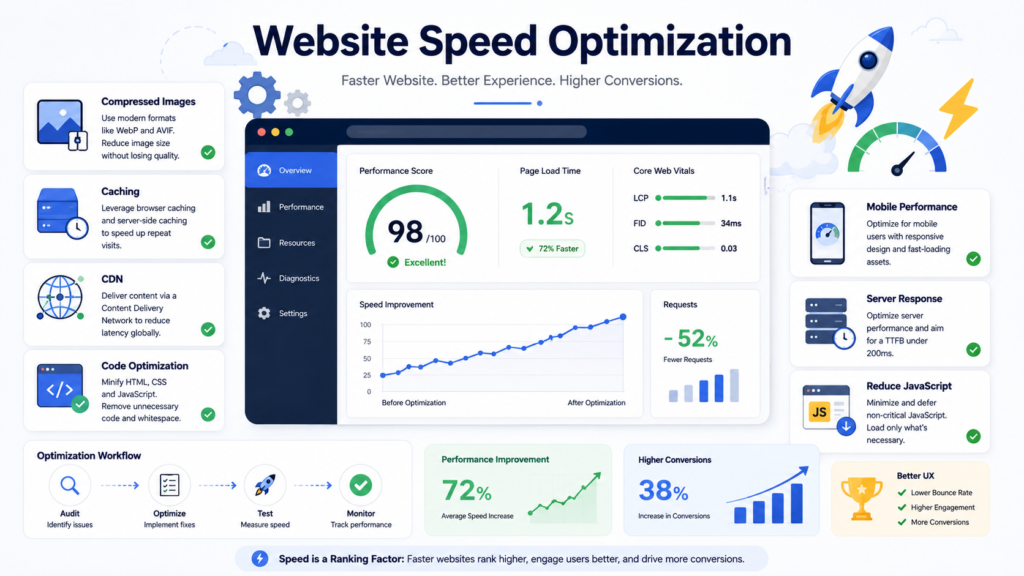
1. Compress Large Images
Images are often among the largest resources on a webpage.
Resize images to appropriate dimensions and use efficient formats such as WebP or AVIF where suitable.
2. Use Lazy Loading Carefully
Images and media below the visible portion of a page can often load later.
However, important above the fold content, especially an LCP image, should not be unnecessarily delayed.
3. Reduce Unnecessary JavaScript
Too much JavaScript can increase processing time and hurt responsiveness.
Remove scripts that provide little business value.
4. Improve Server Response
Slow hosting or poor server configuration can delay the entire page.
5. Use Browser Caching
Caching allows returning visitors to reuse resources instead of downloading everything again.
6. Minify CSS and JavaScript
Removing unnecessary characters and reducing file sizes can make resources more efficient.
7. Remove Unused Plugins
This is particularly important for WordPress websites.
Plugins can add scripts, database queries, stylesheets, or external requests.
8. Optimize Fonts
Excessive font files, weights, and styles can slow rendering.
9. Use a CDN
A properly configured CDN can improve content delivery for geographically distributed audiences.
10. Control Third Party Tools
Analytics, heatmaps, advertising pixels, live chat, social embeds, and marketing tools should be evaluated based on their actual value.
Do not keep a slow third party script simply because it was installed years ago.
How to Test Website Speed
One of the easiest starting points is Google’s PageSpeed Insights.
PageSpeed Insights helps website owners examine performance on mobile and desktop and provides diagnostic information about potential improvements.
You can also use:
- Google Search Console Core Web Vitals report
- Chrome DevTools
- Lighthouse
- Chrome User Experience data
- WebPageTest
An important professional practice is comparing lab data and real user data.
Lab testing helps diagnose problems in a controlled environment.
Field data helps reveal what actual visitors experience across different devices and network conditions.
Do not optimize only for a single Lighthouse screenshot.
Common Website Speed Mistakes
Several mistakes appear repeatedly during technical SEO audits.
Chasing a Perfect 100 Score
Google explicitly notes that trying to achieve a perfect score purely for SEO may not be the best use of your time.
Focus on meaningful user and business improvements.
Compressing Images Without Checking Quality
An image can become technically small but visually poor.
Balance performance with presentation.
Removing Important Functionality
Do not break checkout, analytics, accessibility, forms, or conversion tracking simply to gain a few performance points.
Testing Only the Homepage
Important landing pages may use completely different templates.
Test:
- Homepage
- Service pages
- Blog posts
- Category pages
- Product pages
- Contact pages
- Checkout flows
Ignoring Mobile Users
Desktop performance alone does not provide a complete picture.
Installing More Optimization Plugins
Adding several caching and performance plugins can create conflicts instead of fixing the underlying problem.
Website Speed Optimization Cost
There is no universal price for website speed optimization.
The cost depends on factors such as:
- Website size
- Platform
- Hosting environment
- Number of templates
- Plugin usage
- JavaScript complexity
- Ecommerce functionality
- Core Web Vitals problems
- CDN requirements
- Development work
- Third party integrations
A simple business website may require relatively straightforward image, caching, and code improvements.
A large Shopify, WooCommerce, SaaS, or custom website may require deeper technical investigation.
For this reason, a professional SEO Audit is often the most useful first step because it identifies the actual issues before development time is spent.
Website Speed Maintenance and Prevention Tips
Performance can deteriorate after optimization if nobody monitors the site.
Use a regular maintenance process.
Monthly Website Performance Checklist
- Check Core Web Vitals.
- Test important landing pages.
- Review new plugins and applications.
- Compress newly uploaded images.
- Review third party scripts.
- Check server performance.
- Monitor mobile performance.
- Review template changes.
- Test after major website updates.
- Compare conversions before and after major performance changes.
A useful additional practice is creating a performance budget.
For example, your development team might define limits for image size, script weight, or the number of third party resources allowed on key templates.
This helps prevent a fast website from gradually becoming slow again.
When to Call a Professional for Website Speed Optimization
Consider professional support when:
- PageSpeed scores remain poor after basic fixes
- Core Web Vitals repeatedly fail
- Your site has become slower over time
- Traffic is high but conversions are weak
- Mobile performance is poor
- Developers cannot identify the bottleneck
- Your ecommerce store uses many applications
- JavaScript is affecting responsiveness
- A redesign caused performance problems
- Organic traffic declined after technical changes
- You are planning a website migration
- You cannot safely remove scripts or plugins
Technical changes should be tested carefully.
Removing JavaScript, changing caching, replacing hosting, editing a CDN, delaying scripts, or modifying critical rendering behaviour can break important functionality if implemented incorrectly.
Why Choose Us for Website Speed Optimization and Technical SEO?
Website speed should not be treated as an isolated number.
Our approach connects performance with the broader technical SEO health of the website.
Through our Technical SEO Services, we can evaluate issues involving:
- Website speed
- Core Web Vitals
- Crawling
- Indexing
- Mobile performance
- Technical architecture
- Redirects
- Broken links
- Canonicalization
- Sitemap issues
- Website migrations
- Page experience
For businesses that need a broader diagnosis before making changes, our SEO Audit Services can identify technical, content, and visibility problems affecting organic performance.
You can also review our On-Page SEO Services when titles, headings, content structure, internal links, and search intent need improvement alongside technical performance.
Make Website Speed Part of Your Growth Strategy
Website speed matters because it affects more than loading time.
It influences:
User experience → engagement → SEO → conversions → revenue → customer satisfaction
A fast website cannot compensate for poor content, weak products, or an unclear offer.
But a slow website can make strong content and good products harder to experience.
The best strategy is therefore to combine website performance optimization with strong technical SEO, helpful content, mobile usability, search intent optimization, and conversion focused design.
If your website is slow, failing Core Web Vitals, or experiencing technical SEO problems, explore our Technical SEO Services and start identifying the issues that are limiting performance.